Writing Agent
Draft, edit, and refine your documents with AI-powered writing assistance
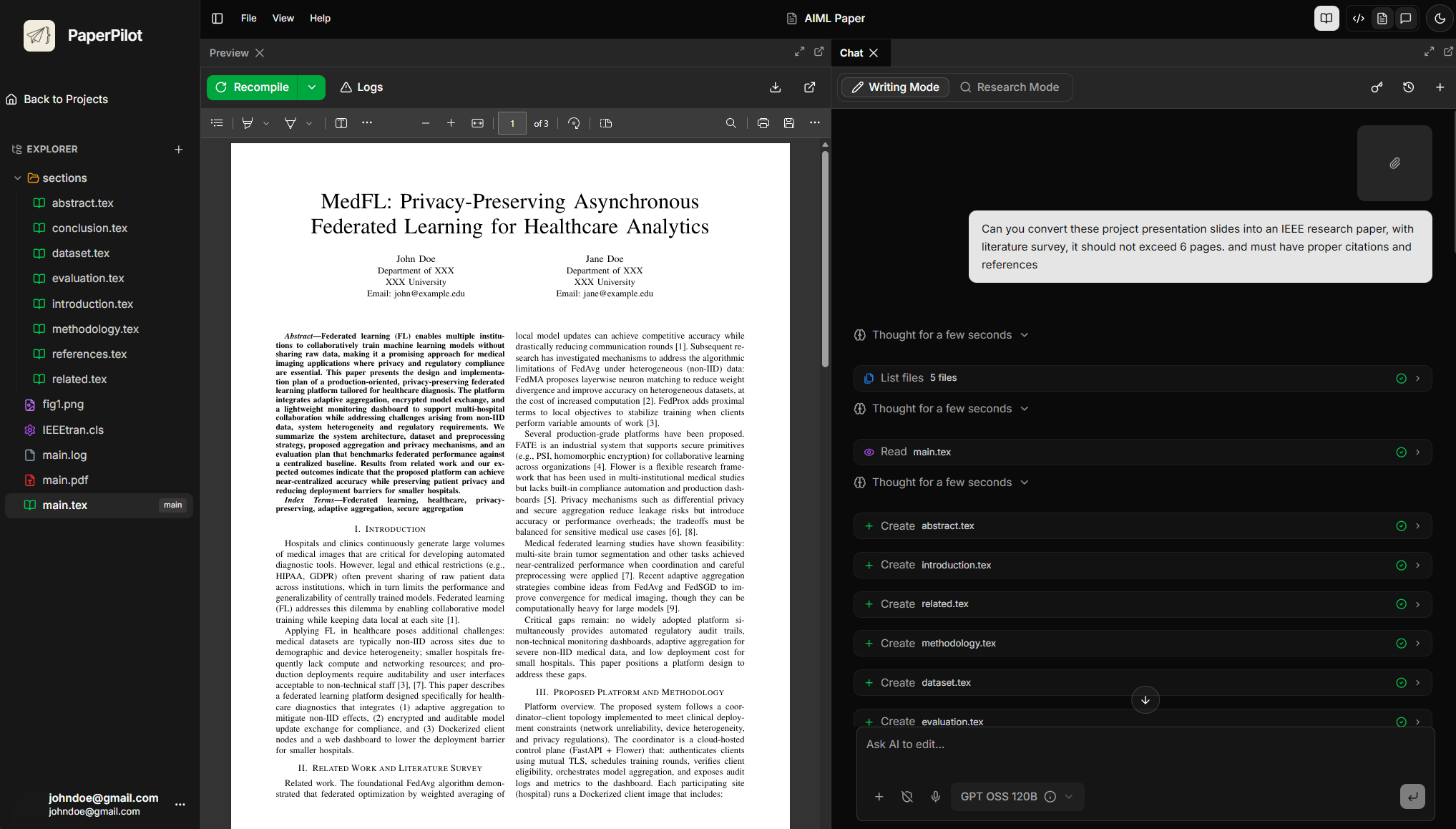
The Writing Agent is your AI co-author. It has direct access to your project files and can draft new content, edit existing text, fix errors, and restructure your documents.
Capabilities
✍️ Content Drafting
The Writing Agent can generate new content based on your instructions and project context.
Describe What You Need
Be specific about the section, length, and style:
Write a 300-word introduction for my paper on climate change impacts on agriculture. Include context about global food security.Review the Draft
The agent will generate content that fits your document's context and style.
Request Revisions
Ask for changes until you're satisfied:
Make it more formal and add a thesis statement at the endApply to Document
Once approved, the agent can insert the content directly into your file.
📝 Document Editing
The agent can modify existing content:
Rewrite paragraph 3 in the introduction to be more concise The agent will locate the
paragraph and offer an improved version.
Expand the methodology section to include more details about the experimental setup Add
depth and detail to thin sections.
This section is too long. Reduce it by 30% while keeping the key points Trim verbose
content without losing meaning.
The transition between sections 2 and 3 is awkward. Improve it. Address specific writing
quality issues.
📁 File Manipulation
The Writing Agent can work directly with your project files:
| Action | Example Prompt |
|---|---|
| Create files | "Create a new file called abstract.tex with a draft abstract" |
| Modify files | "Add the methodology content to chapters/methods.tex" |
| Restructure | "Split this large file into separate chapter files" |
| Organize | "Move the figures section to a new appendix.tex file" |
File changes are shown for your approval before being applied. You can accept, reject, or request modifications.
🔧 Error Diagnosis & Fixing
When LaTeX compilation fails, the Writing Agent analyzes logs and fixes issues:
Compilation Fails
The agent automatically notices when compilation errors occur and offers to assist.
Log Analysis
It reads the error log and identifies the problem:
I see a "Missing $ inserted" error on line 45 of main.tex. This is because you have an underscore in regular text mode.Suggested Fix
The agent proposes a correction:
% Before (error)
The learning_rate was set to 0.001

% After (fixed)
The learning\_rate was set to 0.001
Apply Fix
Approve the fix to apply it automatically to your source code.
🎨 Style & Formatting
Maintain consistent LaTeX formatting across your document:
- "Ensure all figures use the same caption style"
- "Standardize the citation format throughout"
- "Add proper spacing after all section headers"
- "Convert all itemize lists to enumerate where appropriate"
Project Context Awareness
The Writing Agent maintains an updated understanding of your project:
- File Structure — Knows all files and their relationships
- Content Map — Understands what's in each section
- Cross-references — Tracks labels, citations, and references
- Style Patterns — Learns your formatting preferences
The agent gets better as it learns your project. Early interactions help it understand your document's structure and style.
Example Prompts
Drafting
- "Write a conclusion that summarizes our three main findings"
- "Draft a related work section covering transformer architectures"
- "Create an acknowledgments section thanking my advisor"
Editing
- "Make the abstract more impactful"
- "Add transition sentences between paragraphs in section 2"
- "Improve the flow of the results section"
Technical LaTeX
- "Add a figure environment for
figure1.pngwith caption" - "Create a table comparing the three methods"
- "Set up the bibliography with BibTeX"
Problem Solving
- "Why won't my document compile?"
- "The PDF looks different from what I expected in section 3"
- "How do I add line numbers for review submission?"
Tips for Best Results
Provide Context
Reference specific files, sections, or line numbers when asking for edits.
Review Changes
Always review AI-generated content. The agent is a helpful co-author, not a replacement for your expertise.
Iterate Gradually
Make incremental changes rather than asking for complete rewrites. This gives you more control over the output.